
MACOS
Import the custom skin on macOS
- 1
Open the original repository and download the latest source.
- 2
Open the
macosfolder. - 3
Run
Install Codex Dream Skin.command.
Explore custom Codex examples, preview your own wallpaper, and follow practical import guidance for Codex Dream Skin on macOS or Windows.
Not affiliated with OpenAI or the repository author.







The essentials
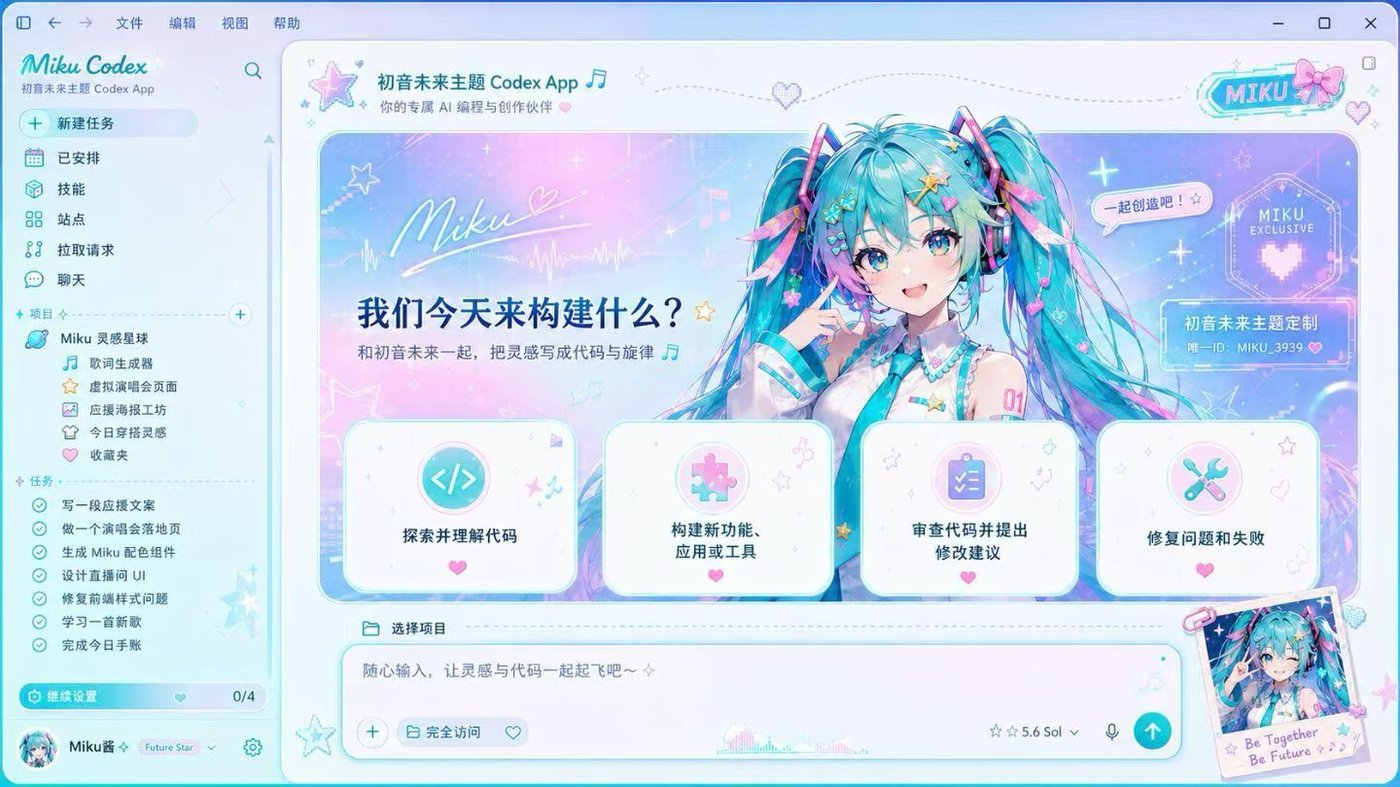
A visual layer for a more personal coding workspace—without replacing the official Codex app.
A custom skin combines a background, coordinated colors, and translucent panels while keeping projects, prompts, and conversations usable.
Codex Dream Skin applies this visual layer through a local CDP connection instead of repackaging the official app. You can change the appearance, restore the default interface, and keep your model provider settings separate.
Turn a wallpaper and color palette into a focused workspace.
Navigation, cards, and the prompt box stay interactive.
Use the project restore tools to return to the official look.
Wallpaper playground
Choose an image and see how a personalized workspace could feel. The preview runs locally in your browser; nothing is uploaded or stored.
JPG, PNG, or WebP. Wide images work best.
Your custom Codex preview
Wide images usually produce the most flexible result because the desktop workspace is landscape-oriented. Look for a clear focal point that does not compete with the prompt box, navigation, or text. Images with open space, moderate contrast, and a consistent palette are easier to combine with translucent interface panels.
The preview is a planning tool, not an installer. It helps you judge composition before editing visual assets in Codex Dream Skin. Your selected file remains on your device through a temporary browser URL and disappears when the page is closed or refreshed.
Quick start
Follow the correct path for macOS or Windows. Codex Dream Skin uses local CDP injection and does not modify the official app package.
Open the original repository and download the latest source.
Open the macos folder.
Run Install Codex Dream Skin.command.
Open the original repository and download the latest source.
Open PowerShell in the windows folder.
Run the install script, then the start script.
This is a third-party customization tool, not an OpenAI product. Download only from the original repository, inspect scripts, and avoid running untrusted local software while a CDP debugging port is active.
The exact implementation differs between platforms, so use the guide written for your operating system. On macOS, the repository provides a command-based installer for Apple Silicon and Intel machines. On Windows, PowerShell scripts install and start the customization. Do not copy commands from unrelated websites or download repackaged files from third-party mirrors.
According to the project documentation, the customization does not replace app.asar, alter WindowsApps, or rewrite the official code signature. Visual settings and API provider settings are separate, so applying a skin should not change your API key, model provider, or Base URL. If you want to return to the default interface, use the restore process included in the repository for your platform.
Good to know
Clear answers about compatibility, restoration, privacy, and the relationship between this guide, Codex, and the original project.
No. Codex Dream Skin is an independent open-source project created by Fei-Away. This website is an independent community guide and is not affiliated with OpenAI or the repository author. We explain the project, provide a local preview, and direct downloads to the original source.
The Codex theme import process is platform-specific. Download the current source from the author's repository, use the macOS command or Windows PowerShell scripts, and follow the included verification steps. There is no upload or one-click import on this website.
Start with the repository documentation and existing issues for Codex theme support. Because this site does not maintain the software, compatibility bugs and script errors should be checked against the latest release and reported to the original project with your operating system, Codex version, and relevant error output.
The original Codex theme GitHub project covered by this guide is Fei-Away/Codex-Dream-Skin. Avoid unofficial mirrors and repackaged installers. Using the source repository lets you review scripts, releases, documentation, open issues, and restore instructions.
According to the project documentation, it uses local CDP injection and does not modify the Codex app package, app.asar, WindowsApps, or the official code signature. Review the latest documentation because implementation details can change over time.
Yes. Restoration is supported through the tools included with Codex Dream Skin. Follow the platform-specific restore instructions and run the verification step if available. Keep the original repository bookmarked so you always have the current procedure.
No third-party script should be described as risk-free. Review the source, download only from the original repository, and understand that a local debugging port is used while the customization runs. Avoid running untrusted local programs during that time.
No. The preview uses a temporary local browser URL. Your wallpaper is not sent to our server or stored by this website. Refreshing or closing the page removes the browser preview.
Use a wide, high-resolution image with enough quiet space for interface text. Avoid very busy patterns behind the prompt area. Check both light and dark details, and confirm that buttons and navigation remain readable before keeping the design.
ONE IMAGE. A WHOLE NEW MOOD.